Design Login Flows: How Much Security Is Enough?
Have you ever noticed how wildly different apps handle that first moment when you're trying to get in?
Posted on Nov 26, 2025
As a product designer, I spend a lot of time looking at other apps. Whenever I see a slick login flow: magic links from Notion, passkeys from Stripe, or smooth biometrics in fintech apps, my first reaction is always: “That’s nice. We should do that.”
But then reality kicks in.
The moment I try to “borrow” those patterns, the questions start showing up:
- Why this approach? Is it actually more secure, or just looks better?
And the bigger one:
- If security matters so much, why doesn’t everyone just do the same thing?
Some apps trust you with just a password. Others treat every login like a high-risk event. Some remember you forever, others keep asking you to verify again and again. Most of us are drawn to whatever looks good and hoping for the best. But maybe it’s time to slow down and understand what we’re actually adopting, and why.
Login is a security decision
A login flow is not just an entry point into a product. It’s a security decision. In fact, stolen or weak credentials remain one of the most common attack vectors. About 49% of data breaches still come down to compromised passwords, and it’s only getting worse (Spacelift, 2025). So every choice we make here, password, OTP, biometrics, isn’t just UI. It’s a statement about how much we trust users, how much risk we accept, and what happens when things go wrong. What looks like small differences in UI are actually different trade-offs.
And that’s where it gets uncomfortable.
As designers, we’re trained to remove friction. But in authentication, less friction doesn’t always mean better. Sometimes it just means more risk. Once I started looking at login this way, the differences across apps made more sense. They weren’t just designing UI, they were making decisions about risk.
What is authentication?
At its core, authentication is simple: proving you are who you say you are. Before any UI pattern or trendy login method, it answers one question: why should the system trust you right now?
Traditionally, authentication falls into three types:
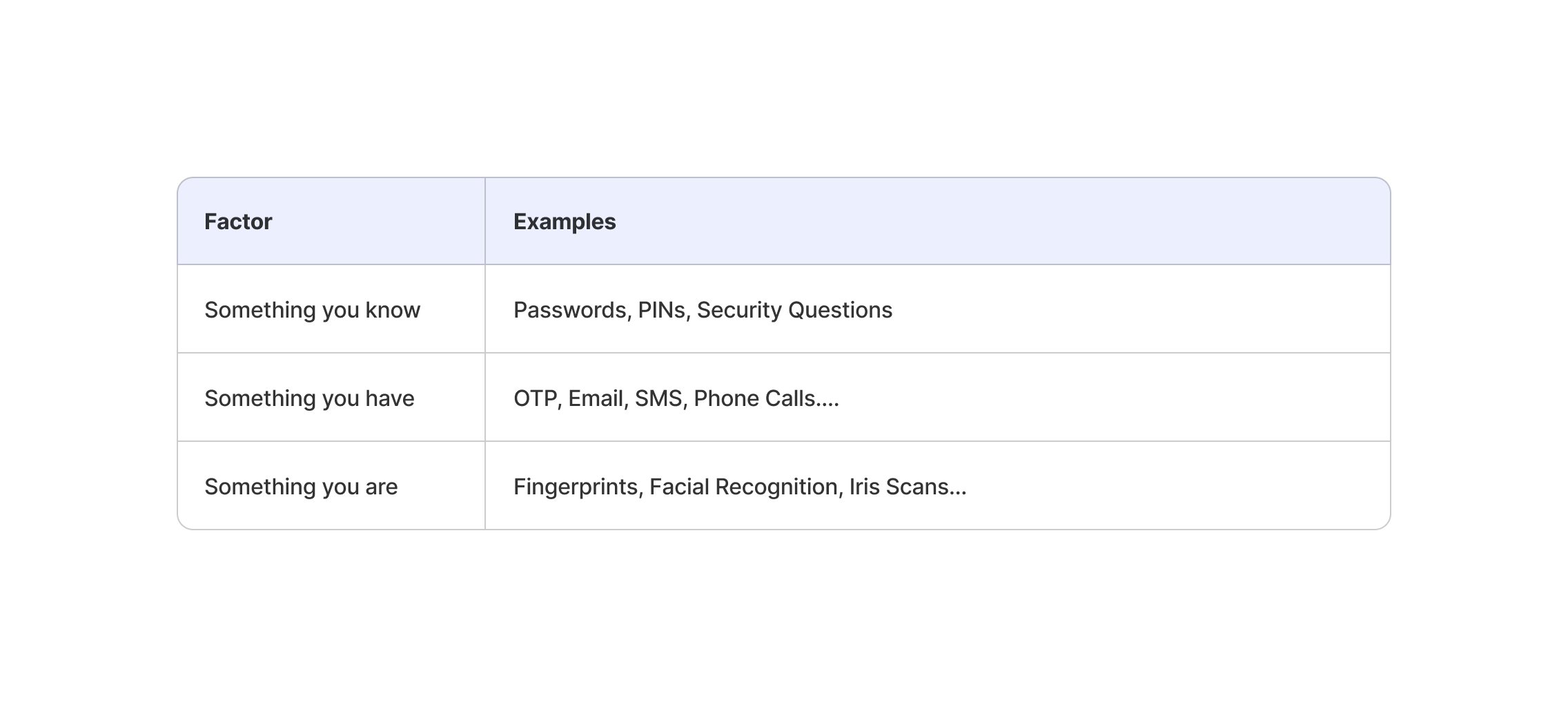
Seen through a security lens, the question isn’t which factor is “best,” but how much protection is enough. Because any single layer can fail:
- Passwords get leaked
- Devices get lost
- Biometrics aren’t foolproof
That’s why strong systems don’t rely on just one signal. They combine multiple layers, each covering the weaknesses of the others. The goal isn’t to make login harder for the sake of it, but to reduce the chances that a single failure leads to a full account compromise. Once you start thinking in layers instead of features, the logic behind multi-factor authentication (MFA) becomes much easier to understand.
So… what is MFA really?
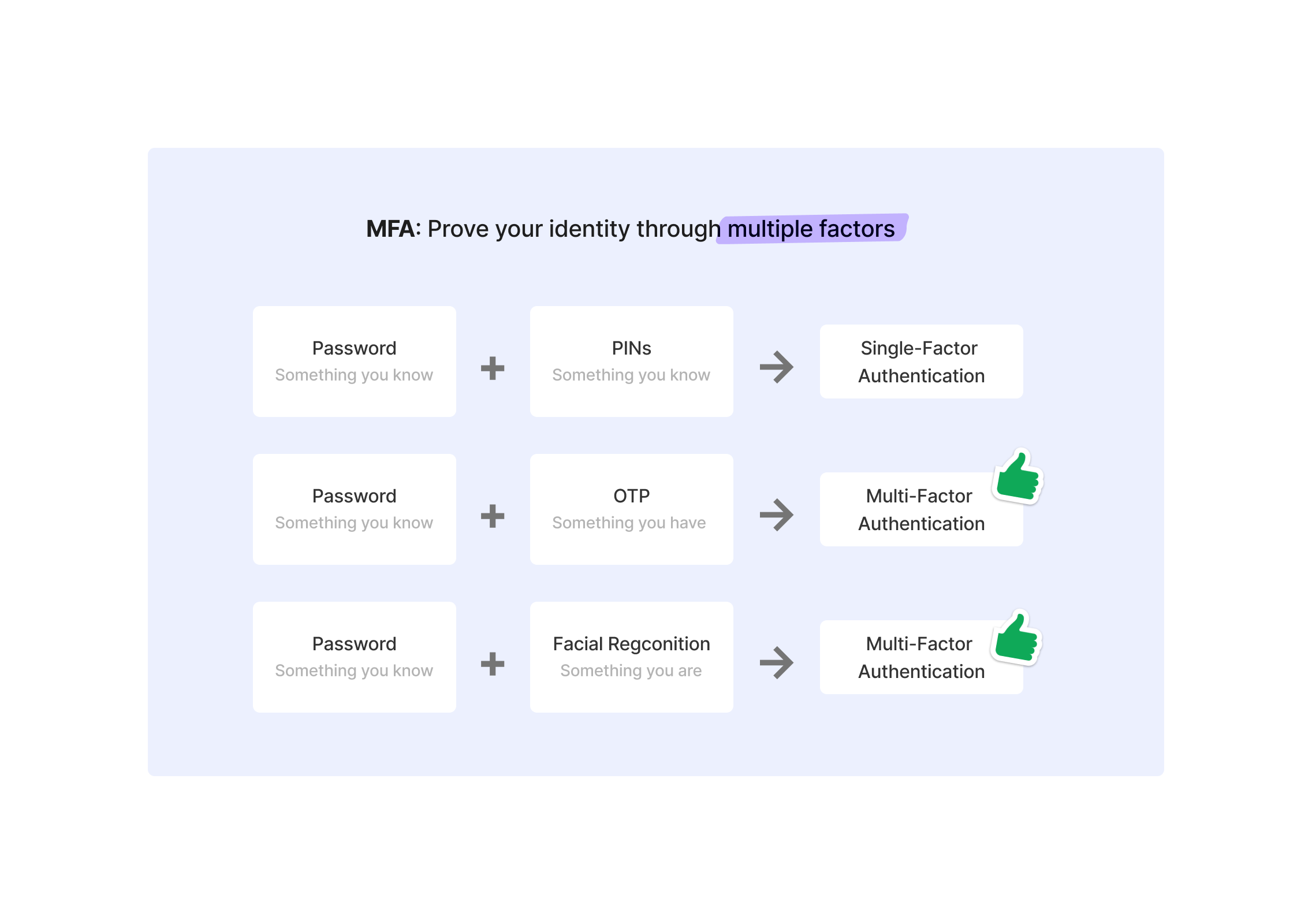
Multi-factor authentication (MFA) often gets talked about as if it were a feature, something you “turn on” to make an app more secure. But MFA isn’t about adding more steps. It’s about combining different kinds of proof, so that a single failure doesn’t automatically lead to a compromised account.
This distinction matters, because not all combinations actually make a system safer. Using the same type of factor twice doesn’t change the underlying risk.
What actually makes MFA work is diversity. When a login flow combines signals from different factors, for example, something you know and something you have. It becomes much harder for an attacker to succeed with a single tactic. Stealing a password is no longer enough if access also depends on a device you physically possess. That’s why combinations like password + OTP are considered real MFA.
How much security is enough?
After understanding MFA, the next question is obvious: Does every login need it?
Not every login needs MFA
The short answer is no. And that’s not a flaw in security design, but a deliberate choice. Not all products carry the same risk, and not all actions are equally sensitive. For many apps, a simple password or social login is enough for the level of threat they face. A meditation app or content platform isn’t protecting assets that would cause serious damage if compromised. In those cases, forcing MFA can add more friction than value.
Mindvalley and Flo use single-factor authentication. Users can simply login with their password.
When MFA becomes non-negotiable
On the other end are products where the stakes are much higher. Banking apps, crypto wallets, trading platforms, and enterprise tools dealing with sensitive data don’t have much room for error. In these cases, MFA is expected. The cost of an account takeover is high, and relying on a single factor simply isn’t enough.
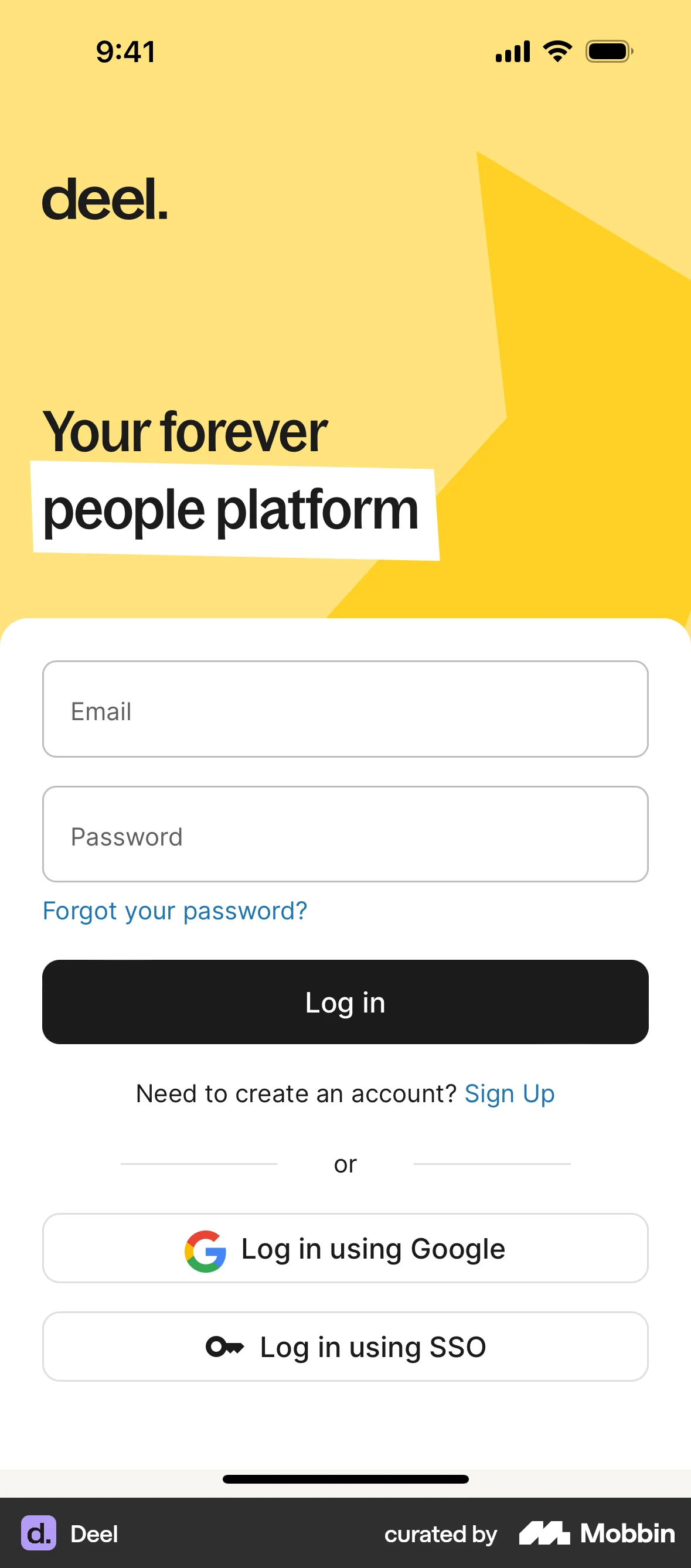
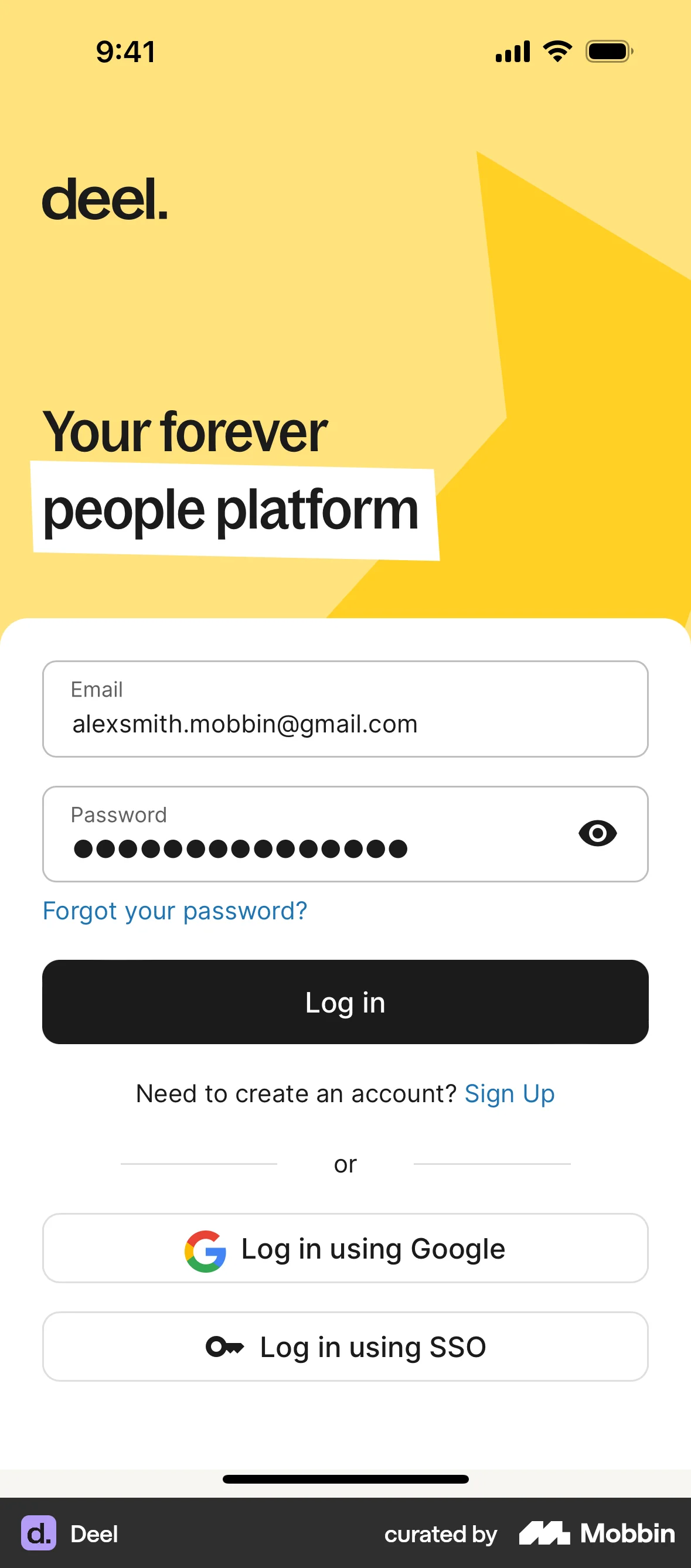
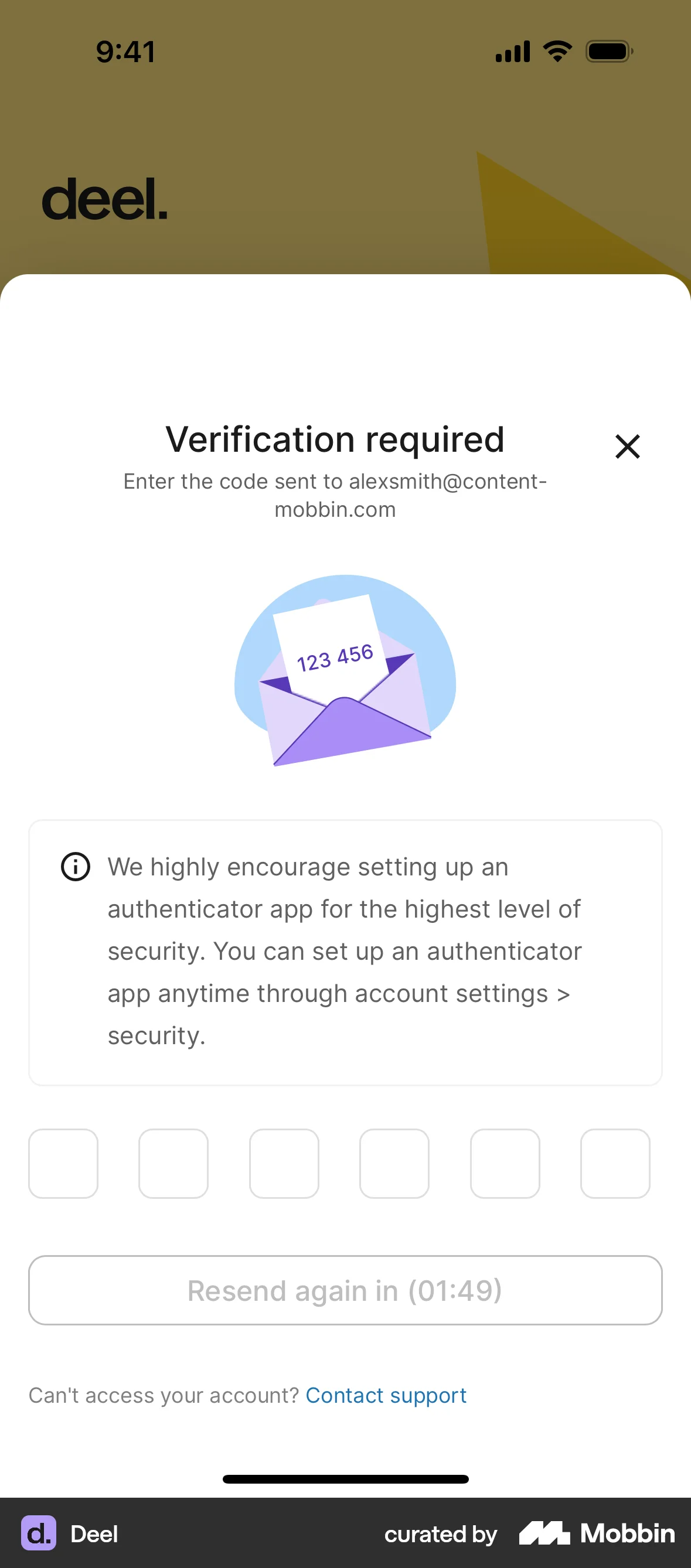
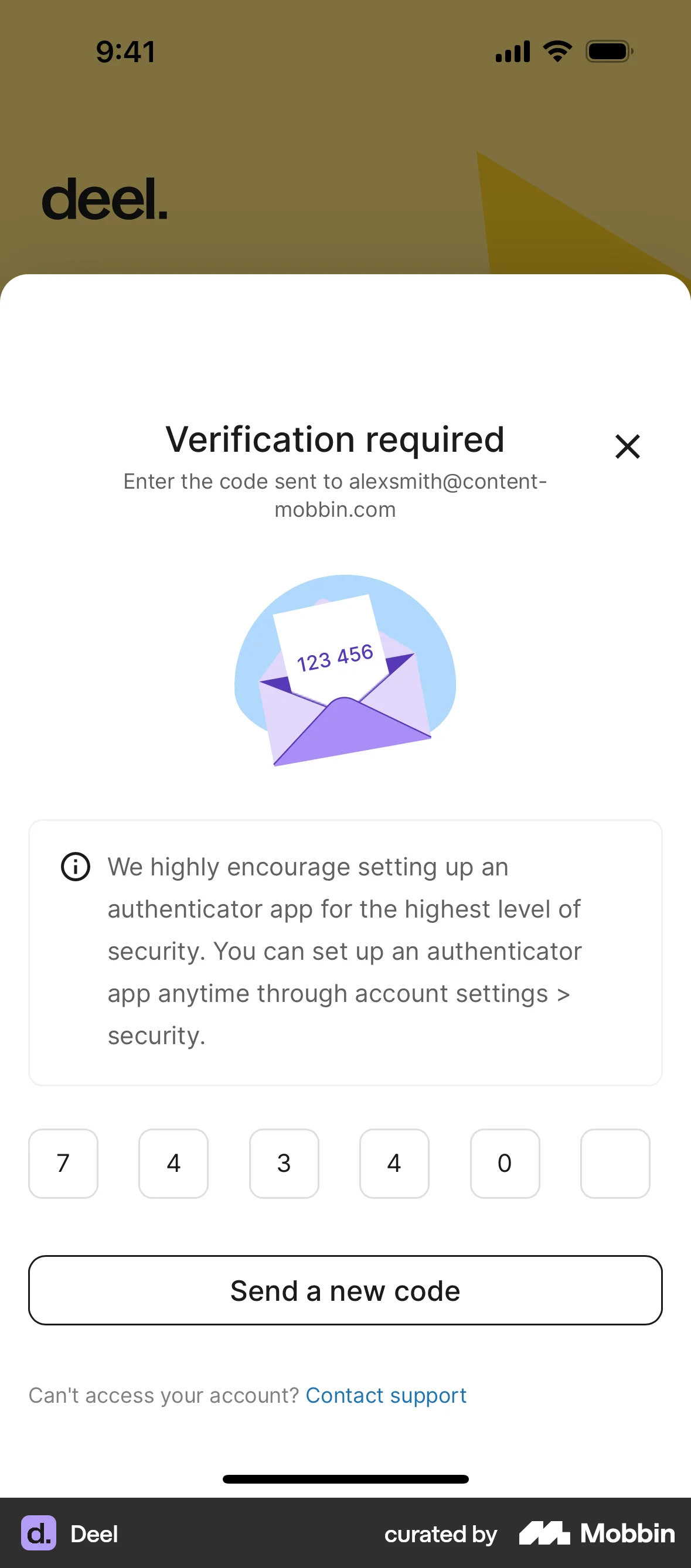
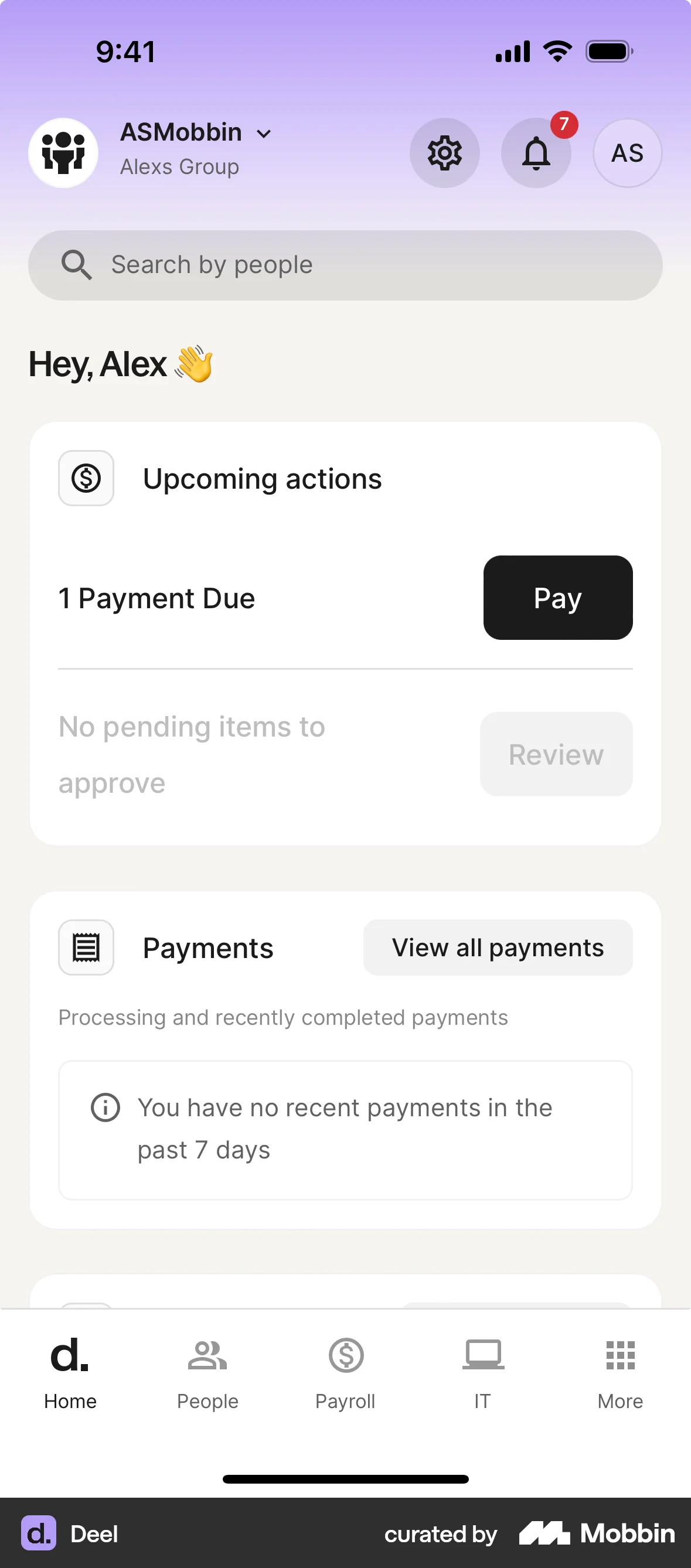
Deel is a global people platform that helps companies manage hiring, payroll, and compliance across countries. For login, the app supports multi-factor authentication by combining a password with email-based verification to add an extra layer of security.
Between extremes: how context shapes authentication
Between these two extremes is where things get interesting. Many apps don’t fit neatly into “low risk” or “high risk.” They serve different users, across different devices, in different situations. That’s where risk-based authentication comes in.
Instead of treating every login the same, the system adapts based on context:
- Known device, usual location → let them in
- New device, new country, sensitive action → ask for more proof
MFA becomes something the system asks for when needed, not something users go through every time.
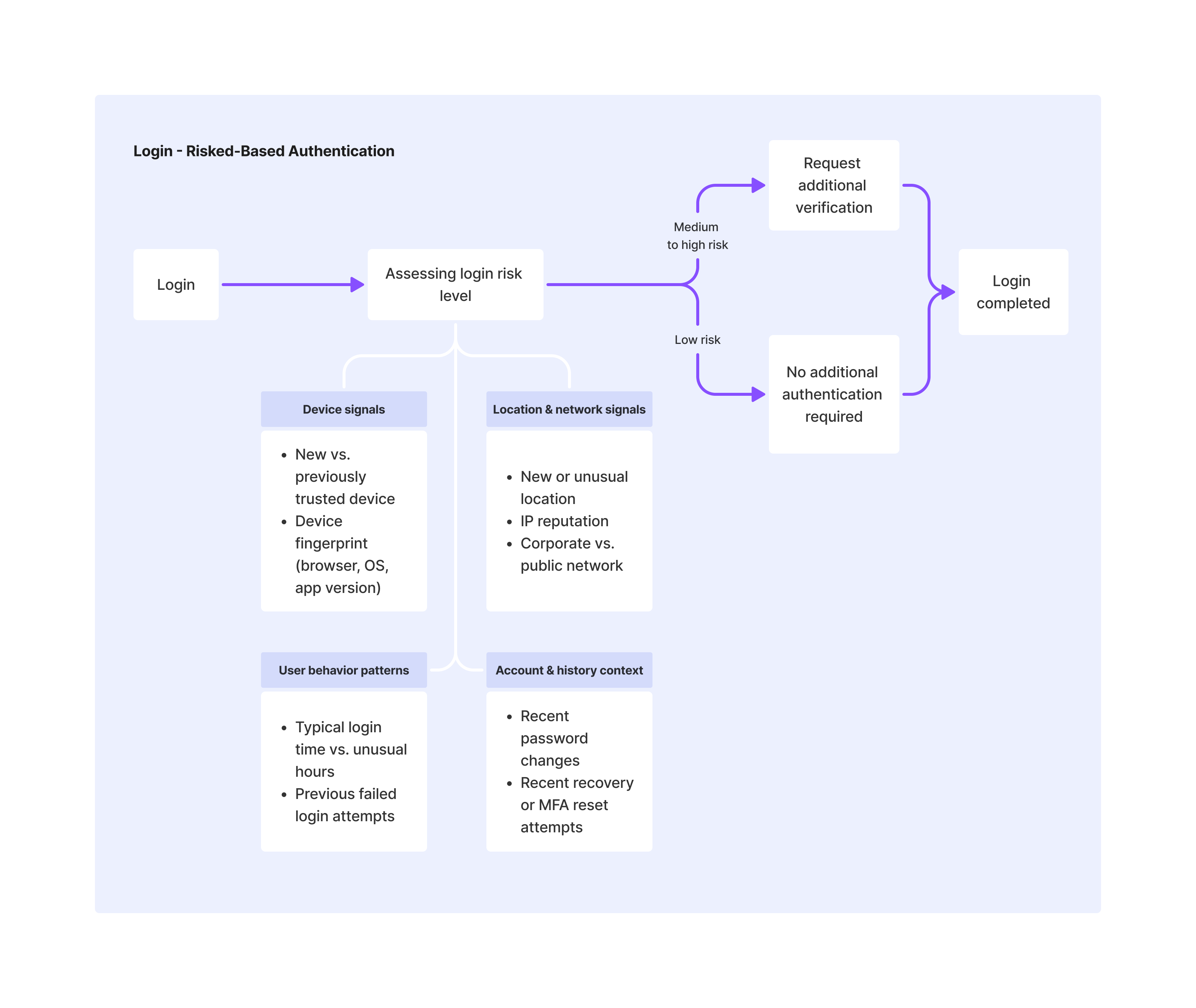
This flexibility helps explain why authentication looks so different across products, and even within the same product. A flow that feels “too relaxed” in one context may be perfectly appropriate in another. What matters is not whether MFA is always present, but whether the system knows when to increase friction and why.
Modern authentication methods like passkeys and magic links fit naturally into this.
A passkey, for example, is technically a single factor, but it’s a very strong one, resistant to phishing and tied to a specific device. For many use cases, that strength alone is enough, especially when combined with device trust and contextual signals.
Magic links work similarly by shifting trust to email ownership, which may be acceptable for low-risk access but less suitable when real assets are involved.
BingX uses passkeys to enable passwordless login, relying on a device-bound cryptographic credential as a strong single-factor authentication method. Matter, on the other hand, uses magic links sent via email, allowing users to authenticate through email ownership, also a form of single-factor authentication.
Seen this way, authentication isn’t a binary choice between “secure” and “convenient.” It’s a spectrum. A weak MFA flow can be less secure than a well-designed single-factor one. What really matters is how signals are combined, how independent they are, and how the system reacts when something feels off.
For designers, this changes the problem. It’s not about picking the strongest option and applying it everywhere. It’s about matching security to context. And once you see it that way, the question “how much security is enough?” no longer has one answer. It depends on the user, the moment, and the risk.
References

OWASP Foundation. (n.d.). Authentication cheat sheet.

OWASP Foundation. (n.d.). Multifactor authentication cheat sheet.
Spacelift. (2024). Password statistics: How secure are passwords in 2024?
Let's work together
Feel free to reach out. I’d love to hear what you’re working on.

Work
About me
Notes
Gallery
Contact
Design Login Flows: How Much Security Is Enough?
Have you ever noticed how wildly different apps handle that first moment when you're trying to get in?
Posted on Nov 26, 2025
As a product designer, I spend a lot of time looking at other apps. Whenever I see a slick login flow: magic links from Notion, passkeys from Stripe, or smooth biometrics in fintech apps, my first reaction is always: “That’s nice. We should do that.”
But then reality kicks in.
The moment I try to “borrow” those patterns, the questions start showing up:
- Why this approach? Is it actually more secure, or just looks better?
And the bigger one:
- If security matters so much, why doesn’t everyone just do the same thing?
Some apps trust you with just a password. Others treat every login like a high-risk event. Some remember you forever, others keep asking you to verify again and again. Most of us are drawn to whatever looks good and hoping for the best. But maybe it’s time to slow down and understand what we’re actually adopting, and why.
Login is a security decision
A login flow is not just an entry point into a product. It’s a security decision. In fact, stolen or weak credentials remain one of the most common attack vectors. About 49% of data breaches still come down to compromised passwords, and it’s only getting worse (Spacelift, 2025). So every choice we make here, password, OTP, biometrics, isn’t just UI. It’s a statement about how much we trust users, how much risk we accept, and what happens when things go wrong. What looks like small differences in UI are actually different trade-offs.
And that’s where it gets uncomfortable.
As designers, we’re trained to remove friction. But in authentication, less friction doesn’t always mean better. Sometimes it just means more risk. Once I started looking at login this way, the differences across apps made more sense. They weren’t just designing UI, they were making decisions about risk.
What is authentication?
At its core, authentication is simple: proving you are who you say you are. Before any UI pattern or trendy login method, it answers one question: why should the system trust you right now?
Traditionally, authentication falls into three types:
Seen through a security lens, the question isn’t which factor is “best,” but how much protection is enough. Because any single layer can fail:
- Passwords get leaked
- Devices get lost
- Biometrics aren’t foolproof
That’s why strong systems don’t rely on just one signal. They combine multiple layers, each covering the weaknesses of the others. The goal isn’t to make login harder for the sake of it, but to reduce the chances that a single failure leads to a full account compromise. Once you start thinking in layers instead of features, the logic behind multi-factor authentication (MFA) becomes much easier to understand.
So… what is MFA really?
Multi-factor authentication (MFA) often gets talked about as if it were a feature, something you “turn on” to make an app more secure. But MFA isn’t about adding more steps. It’s about combining different kinds of proof, so that a single failure doesn’t automatically lead to a compromised account.
This distinction matters, because not all combinations actually make a system safer. Using the same type of factor twice doesn’t change the underlying risk.
What actually makes MFA work is diversity. When a login flow combines signals from different factors, for example, something you know and something you have. It becomes much harder for an attacker to succeed with a single tactic. Stealing a password is no longer enough if access also depends on a device you physically possess. That’s why combinations like password + OTP are considered real MFA.
How much security is enough?
After understanding MFA, the next question is obvious: Does every login need it?
Not every login needs MFA
The short answer is no. And that’s not a flaw in security design, but a deliberate choice. Not all products carry the same risk, and not all actions are equally sensitive. For many apps, a simple password or social login is enough for the level of threat they face. A meditation app or content platform isn’t protecting assets that would cause serious damage if compromised. In those cases, forcing MFA can add more friction than value.
Mindvalley and Flo use single-factor authentication. Users can simply login with their password.
When MFA becomes non-negotiable
On the other end are products where the stakes are much higher. Banking apps, crypto wallets, trading platforms, and enterprise tools dealing with sensitive data don’t have much room for error. In these cases, MFA is expected. The cost of an account takeover is high, and relying on a single factor simply isn’t enough.
Deel is a global people platform that helps companies manage hiring, payroll, and compliance across countries. For login, the app supports multi-factor authentication by combining a password with email-based verification to add an extra layer of security.
Between extremes: how context shapes authentication
Between these two extremes is where things get interesting. Many apps don’t fit neatly into “low risk” or “high risk.” They serve different users, across different devices, in different situations. That’s where risk-based authentication comes in.
Instead of treating every login the same, the system adapts based on context:
- Known device, usual location → let them in
- New device, new country, sensitive action → ask for more proof
MFA becomes something the system asks for when needed, not something users go through every time.
This flexibility helps explain why authentication looks so different across products, and even within the same product. A flow that feels “too relaxed” in one context may be perfectly appropriate in another. What matters is not whether MFA is always present, but whether the system knows when to increase friction and why.
Modern authentication methods like passkeys and magic links fit naturally into this.
A passkey, for example, is technically a single factor, but it’s a very strong one, resistant to phishing and tied to a specific device. For many use cases, that strength alone is enough, especially when combined with device trust and contextual signals.
Magic links work similarly by shifting trust to email ownership, which may be acceptable for low-risk access but less suitable when real assets are involved.
BingX uses passkeys to enable passwordless login, relying on a device-bound cryptographic credential as a strong single-factor authentication method. Matter, on the other hand, uses magic links sent via email, allowing users to authenticate through email ownership, also a form of single-factor authentication.
Seen this way, authentication isn’t a binary choice between “secure” and “convenient.” It’s a spectrum. A weak MFA flow can be less secure than a well-designed single-factor one. What really matters is how signals are combined, how independent they are, and how the system reacts when something feels off.
For designers, this changes the problem. It’s not about picking the strongest option and applying it everywhere. It’s about matching security to context. And once you see it that way, the question “how much security is enough?” no longer has one answer. It depends on the user, the moment, and the risk.
References
OWASP Foundation. (n.d.). Authentication cheat sheet.
OWASP Foundation. (n.d.). Multifactor authentication cheat sheet.
Spacelift. (2024). Password statistics: How secure are passwords in 2024?
Let's work together
Feel free to reach out. I’d love to hear what you’re working on.
Login is a security decision
What is authentication?
So… what is MFA really?
How much security is enough?
Work
About me
Notes
Gallery
Contact
Design Login Flows: How Much Security Is Enough?
Have you ever noticed how wildly different apps handle that first moment when you're trying to get in?
Posted on Nov 26, 2025
As a product designer, I spend a lot of time looking at other apps. Whenever I see a slick login flow: magic links from Notion, passkeys from Stripe, or smooth biometrics in fintech apps, my first reaction is always: “That’s nice. We should do that.”
But then reality kicks in.
The moment I try to “borrow” those patterns, the questions start showing up:
- Why this approach? Is it actually more secure, or just looks better?
And the bigger one:
- If security matters so much, why doesn’t everyone just do the same thing?
Some apps trust you with just a password. Others treat every login like a high-risk event. Some remember you forever, others keep asking you to verify again and again. Most of us are drawn to whatever looks good and hoping for the best. But maybe it’s time to slow down and understand what we’re actually adopting, and why.
Login is a security decision
A login flow is not just an entry point into a product. It’s a security decision. In fact, stolen or weak credentials remain one of the most common attack vectors. About 49% of data breaches still come down to compromised passwords, and it’s only getting worse (Spacelift, 2025). So every choice we make here, password, OTP, biometrics, isn’t just UI. It’s a statement about how much we trust users, how much risk we accept, and what happens when things go wrong. What looks like small differences in UI are actually different trade-offs.
And that’s where it gets uncomfortable.
As designers, we’re trained to remove friction. But in authentication, less friction doesn’t always mean better. Sometimes it just means more risk. Once I started looking at login this way, the differences across apps made more sense. They weren’t just designing UI, they were making decisions about risk.
What is authentication?
At its core, authentication is simple: proving you are who you say you are. Before any UI pattern or trendy login method, it answers one question: why should the system trust you right now?
Traditionally, authentication falls into three types:
Seen through a security lens, the question isn’t which factor is “best,” but how much protection is enough. Because any single layer can fail:
- Passwords get leaked
- Devices get lost
- Biometrics aren’t foolproof
That’s why strong systems don’t rely on just one signal. They combine multiple layers, each covering the weaknesses of the others. The goal isn’t to make login harder for the sake of it, but to reduce the chances that a single failure leads to a full account compromise. Once you start thinking in layers instead of features, the logic behind multi-factor authentication (MFA) becomes much easier to understand.
So… what is MFA really?
Multi-factor authentication (MFA) often gets talked about as if it were a feature, something you “turn on” to make an app more secure. But MFA isn’t about adding more steps. It’s about combining different kinds of proof, so that a single failure doesn’t automatically lead to a compromised account.
This distinction matters, because not all combinations actually make a system safer. Using the same type of factor twice doesn’t change the underlying risk.
What actually makes MFA work is diversity. When a login flow combines signals from different factors, for example, something you know and something you have. It becomes much harder for an attacker to succeed with a single tactic. Stealing a password is no longer enough if access also depends on a device you physically possess. That’s why combinations like password + OTP are considered real MFA.
How much security is enough?
After understanding MFA, the next question is obvious: Does every login need it?
Not every login needs MFA
The short answer is no. And that’s not a flaw in security design, but a deliberate choice. Not all products carry the same risk, and not all actions are equally sensitive. For many apps, a simple password or social login is enough for the level of threat they face. A meditation app or content platform isn’t protecting assets that would cause serious damage if compromised. In those cases, forcing MFA can add more friction than value.
Mindvalley and Flo use single-factor authentication. Users can simply login with their password.
When MFA becomes non-negotiable
On the other end are products where the stakes are much higher. Banking apps, crypto wallets, trading platforms, and enterprise tools dealing with sensitive data don’t have much room for error. In these cases, MFA is expected. The cost of an account takeover is high, and relying on a single factor simply isn’t enough.
Deel is a global people platform that helps companies manage hiring, payroll, and compliance across countries. For login, the app supports multi-factor authentication by combining a password with email-based verification to add an extra layer of security.
Between extremes: how context shapes authentication
Between these two extremes is where things get interesting. Many apps don’t fit neatly into “low risk” or “high risk.” They serve different users, across different devices, in different situations. That’s where risk-based authentication comes in.
Instead of treating every login the same, the system adapts based on context:
- Known device, usual location → let them in
- New device, new country, sensitive action → ask for more proof
MFA becomes something the system asks for when needed, not something users go through every time.
This flexibility helps explain why authentication looks so different across products, and even within the same product. A flow that feels “too relaxed” in one context may be perfectly appropriate in another. What matters is not whether MFA is always present, but whether the system knows when to increase friction and why.
Modern authentication methods like passkeys and magic links fit naturally into this.
A passkey, for example, is technically a single factor, but it’s a very strong one, resistant to phishing and tied to a specific device. For many use cases, that strength alone is enough, especially when combined with device trust and contextual signals.
Magic links work similarly by shifting trust to email ownership, which may be acceptable for low-risk access but less suitable when real assets are involved.
BingX uses passkeys to enable passwordless login, relying on a device-bound cryptographic credential as a strong single-factor authentication method. Matter, on the other hand, uses magic links sent via email, allowing users to authenticate through email ownership, also a form of single-factor authentication.
Seen this way, authentication isn’t a binary choice between “secure” and “convenient.” It’s a spectrum. A weak MFA flow can be less secure than a well-designed single-factor one. What really matters is how signals are combined, how independent they are, and how the system reacts when something feels off.
For designers, this changes the problem. It’s not about picking the strongest option and applying it everywhere. It’s about matching security to context. And once you see it that way, the question “how much security is enough?” no longer has one answer. It depends on the user, the moment, and the risk.
References
OWASP Foundation. (n.d.). Authentication cheat sheet.
OWASP Foundation. (n.d.). Multifactor authentication cheat sheet.
Spacelift. (2024). Password statistics: How secure are passwords in 2024?
Let's work together
Feel free to reach out. I’d love to hear what you’re working on.